Functions
You've already seen some of Python's built-in functions:
max(1, 3)
pow(2, 4)
You've also seen functions in math. For example:
$f(x) = 2x + 7$
This is the definition of $f(x)$. By itself it doesn't have a value. It just defines what it would mean to call the function $f$ on some value.
Given a value for $x$, we can calculate the resulting value of $f(x)$. $f(2)$ evaluates to 11, $f(-1$) gives 5.
In Python, in addition to using the built-in functions, we can define our own. For example, we can define a function equivalent to $f(x) = 2x + 7$:
def f(x):
    return 2 * x + 7
f(2)
f(-1)
Here is the general form of a function definition:
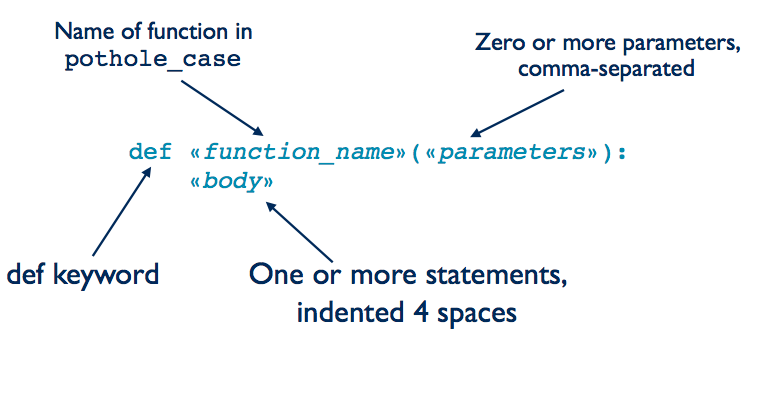
def:
- a keyword indicating a function definition
<<function_name>>:
- the name of the function (use
pothole_casename format)
<<parameters>>:
- the parameter(s) of the function, 0 or more.
- Parameters are a comma-separated list of variables whose values will be supplied when the function is called.
<<body>>:
- One or more statements, often ending with a
returnstatement. - All body statements must be indented the same amount (usually 4 spaces).
The return statement has this form:
return «expression»
The return statement is executed as follows:
- Evaluate the expresssion. The produces a value (which has a memory address).
- Exit the function and produce that value to the caller.
Once a function has been defined, we can call on the function. A function call has the form:
«function_name»(«arguments»)
A function call is executed as follows:
- Evaluate the arguments. These produce values. Each value has a memory address.
- Assign those values to the parameters. This stores the memory addresses of the values in the parameters.
- Pause the current statement and execute the body of the function
Practice Exercise: Functions and Terminology
Revisiting our earlier example, the function definition was:
def f(x):
    return 2 * x + 7
Answer the following questions:
- What is the name of the function?
- How many parameter(s) does the function have?
- What are the parameter(s) names?
- For function call
f(8), what is the argument? - When it is executed, what value does
f(8)produce? - Consider this code:
result = f(4). After that statement is executed, what value doesresultrefer to?
Function Design Recipe
When defining functions, we will follow this Function Design Recipe:
- Write an example call (or two) of how we will use the function we plan to write.
- Write the header for the function. That's the
defline. - Write the type contract -- the type for each parameter and the type of value that will be returned.
- Write a description of what the function does.
- Finally, write the code for the body of the function.
- Then test our function.
Let's write a function that squares a number.
Step 1: Give examples of how we will call the function:
>>> square(5)
25
>>> square(-6)
36
Of course square isn't defined yet, so we can't actually call it. Instead just work out, what the function calls should produce.
Step 2: Write the header, which is the line that starts with def. The function will have one parameter, which we named num, but we could have named it x, value, n, or even banana. Of course, it is best to pick a meaningful name.
While you are at it, make the examples that you wrote be part of a triple-quoted string inside the function (make sure to indent them 4 spaces). This triple-quoted string is called a docstring, which stands for documentation string.
def square(num):
    """
    >>> square(5)
    25
    >>> square(-6)
    36
    """
Step 3: Add a type contract. Our function takes a single parameter which is a number. It returns a number. So the type contract is (number) -> number. Let's add that to our function.
def square(num):
    """ (number) -> number

    >>> square(5)
    25
    >>> square(-6)
    36
    """
Step 4: Write the description and it to the doctstring.
def square(num):
    """(number) -> number

    Return num squared.

    >>> square(5)
    25
    >>> my_abs(-6)
    36
    """
Step 5: Code the body. For this step, we write the Python statements that will be executed when the function is called. We will use a return statement to produce a value.
def square(num):
    """(number) -> number

    Return num squared.

    >>> square(5)
    25
    >>> my_abs(-6)
    36
    """
    return num * num
Step 6: Test our function. For now, we will do this by calling on the examples we developed in Step 1.
square(5)
square(-6)
Practice Exercise: Converting Pounds to Kilograms
Generally in Canada, people know their weight in pounds. Most of the calculations for determining dosages and other medical information, ask for a patient's weight in kilograms. Following the Function Design Recipe, write a function that will convert from pounds to kilograms. (1kg == 2.2 lbs)
Practice Exercise: Using PCRS
You will use a tool called PCRS to complete this week's homework exercise. Login with your UTORid and solve the problem in Phase I: [Your level] Session 1 Practice Exercise. Our instance of PCRS is available here: https://pcrs.teach.cs.toronto.edu/C4M17